
For many archives, libraries, museums, and historical organizations, deciding to adopt a collections management system (CMS) feels like a milestone. It can signal growth, increased professionalism, or a long-needed step toward better control over collections information. But it can also feel overwhelming. With dozens of systems on the market—each promising to solve your problems—it’s easy to jump straight to product comparisons before stepping back to ask a more fundamental question:
What do you actually need your CMS to do?
At DHPSNY, we regularly work with organizations that are eager to implement a CMS but unsure how to start, frustrated by a system they adopted too quickly, or working within a legacy system adopted by earlier staff. The most successful CMS projects are grounded in careful planning, clear goals, and an honest assessment of an organization’s collections, workflows, and capacity.
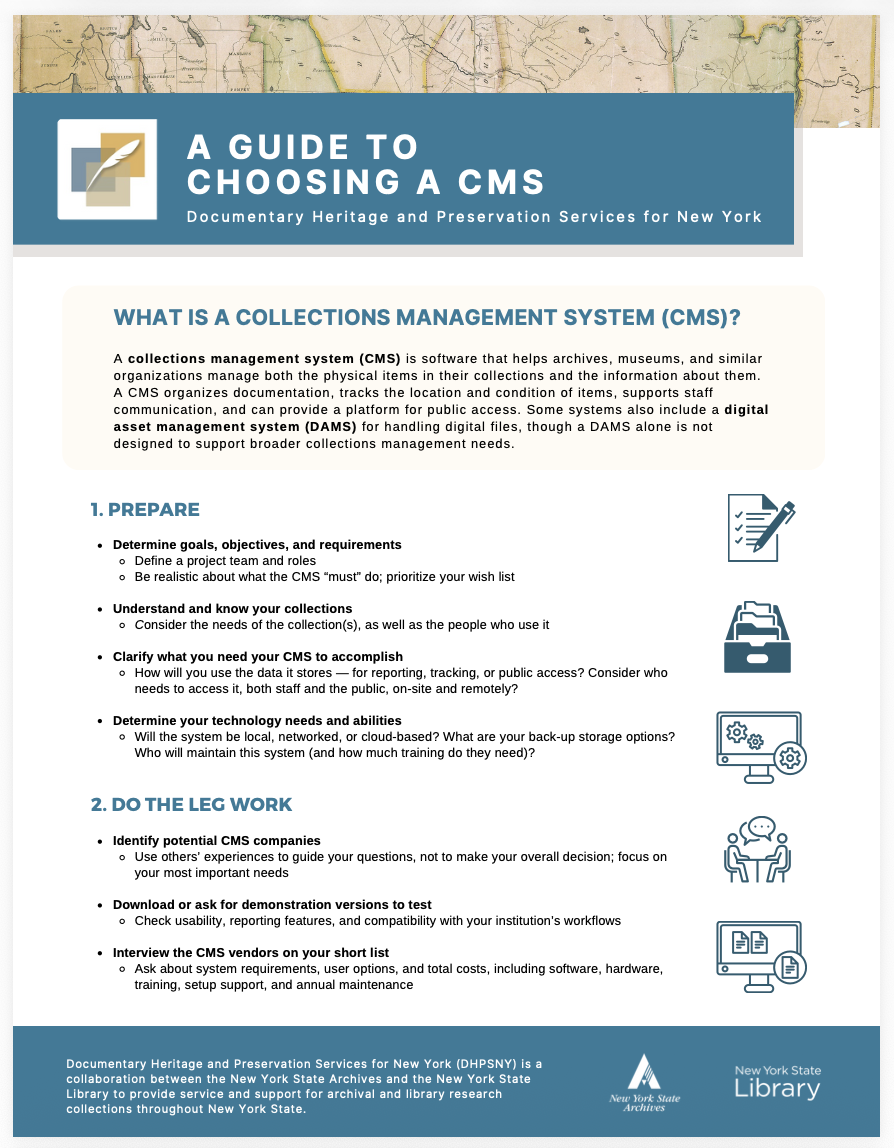
This post outlines how to approach CMS selection strategically, why preparation matters more than the software itself, and how asking the right questions early can save time, money, and staff energy down the line. It also connects directly to DHPSNY’s new technical bulletin, A Guide to Choosing a CMS, which provides a concise framework you can use as you move forward.
What Is a Collections Management System?
A collections management system is software designed to help organizations manage both physical collections and the information associated with them. At its core, a CMS supports documentation, tracks location and condition, facilitates internal communication, and, depending on the system, may also provide public access to collections data.
Some CMS platforms include tools for managing digital files, often described as digital asset management systems (DAMS). While DAMS functionality can be valuable, it’s important to remember that a DAMS alone does not replace a CMS. Managing digital files is only one piece of broader collections management, which also includes accessioning, description, movement tracking, rights management, and preservation planning.
Start with Preparation, Not Products
One of the most common pitfalls in CMS selection is starting with a list of systems rather than a list of needs. Before researching vendors or requesting demos, organizations should invest time in preparation.
This includes clearly defining goals and expectations. Are you primarily trying to gain intellectual control over a collection that has grown organically over decades? Improve staff access to consistent information? Replace an outdated system or one that no longer meets your needs? Support reporting to funders or governing bodies? Expand public access? Each of these goals may point to different system requirements.
Equally important is understanding your collections themselves. What formats are you managing? Are collections described at the group, series, or item level? How consistent or inconsistent is existing documentation? A CMS cannot fix unclear intellectual control or incomplete inventories; it can only store and display the data you put into it.
Preparation also means being realistic. Every CMS comes with trade-offs. Identifying what the system must do versus what would simply be nice to have helps prevent over-buying a platform that exceeds your needs or under-buying one that limits future growth.
People, Workflows, and Capacity Matter
A CMS does not exist in isolation. It sits at the intersection of staff time, institutional workflows, and technical capacity. One of the most important questions to ask early is: Who will use this system, and how?
Consider who will enter data, who will review or edit records, and who will rely on the system for decision-making. Will volunteers be involved? Will multiple departments need access? Will the public interact with the system directly? These questions shape decisions about user permissions, interface complexity, and training needs.
Technology capacity is just as critical. Will the system be cloud-based, locally hosted, or networked? Who will maintain it? What happens when staff turnover occurs? Choosing a CMS that requires advanced technical expertise may not be sustainable for a small organization with limited IT support.
A system that fits your people and workflows, even if it has fewer bells and whistles, will almost always be more successful than one that looks impressive but is difficult to maintain.
Doing the Leg Work: Research with Purpose
Once you’ve clarified your goals and capacity, it’s time to research potential systems with intention. Talking to peers can be helpful, but other organizations’ experiences should inform your questions, not dictate your decisions. A CMS that works for a large museum may be poorly suited to a volunteer-run historical society.
Request demos or trial versions whenever possible and test them against real scenarios. Can staff generate the reports you need? Does the system support your descriptive practices? Is the interface intuitive or will training be a constant burden?
Vendor conversations are also an opportunity to ask direct questions about costs, including licensing fees, training, setup support, customization, maintenance, and long-term sustainability. Understanding the full cost of ownership helps avoid surprises later.
Preparing Your Data Is Not Optional
One of the most underestimated aspects of CMS adoption is data preparation. Migrating information into a new system forces organizations to confront inconsistencies, address gaps, and overhaul outdated practices.
Before transferring data, organizations should decide what information belongs in each field, what terminology will be used consistently, and what, if anything, will be visible to the public. Developing a cataloging manual or internal guidelines at this stage pays dividends later by reducing confusion and duplicative work.
CMS implementation is also a good moment to revisit related policies and procedures. Accessioning practices, documentation standards, and access policies may need to be clarified or updated to align with the new system.
Implementation Is a Process, Not a Finish Line
Choosing a CMS is not the end of the journey, it’s the beginning of a long-term relationship with a system that will shape how you manage and access collections information for years to come.
Assigning a project lead, setting realistic timelines, training users, and gathering feedback are all essential steps. Maintenance responsibilities should be clearly defined, including who handles updates and backups. A CMS that is not actively maintained quickly loses its value.
Perhaps most importantly, organizations should build in time to assess whether the system is meeting expectations and be willing to adjust workflows or documentation practices as needed.
Why Asking the Right Questions Matters
At DHPSNY, we often remind organizations that technology should support people, not the other way around. A CMS is a powerful tool, but only when it aligns with institutional goals, collections realities, and staff capacity.
By slowing down at the beginning and asking thoughtful questions, organizations can avoid costly missteps and build systems that genuinely support stewardship, access, and preservation.
For a concise, step-by-step framework to guide this process, including preparation, research, and implementation, download DHPSNY’s technical bulletin, A Guide to Choosing a CMS, which is also available in Spanish. Additionally, check out DHPSNY's webinar, Collections, Catalogs, and Clouds: How to Choose a Collections Management System.
Do you have a preservation topic, question, or creative solution you would like us to cover in this series? Reach us by email at info@DHPSNY.org, or connect with us on the DHPSNY Facebook page or DHPSNY Community Facebook Group.